
Why does the UK’s tax year begin on 6 April?
Historically, in Britain taxes were due on the first day of the year, which was 25 March (Lady Day). When Britain (and its empire) moved from the Julian calendar to the Gregorian calendar in 1752 it was necessary to ‘lose’ 11 days so that 2 September 1752 was followed by 14 September 1752. Taxpayers did not want to have to pay their taxes 11 days early…
Historically, in Britain taxes were due on the first day of the year, which was 25 March (Lady Day). When Britain (and its empire) moved from the Julian calendar to the Gregorian calendar in 1752 it was necessary to ‘lose’ 11 days so that 2 September 1752 was followed by 14 September 1752. Taxpayers did not want to have to pay their taxes 11 days early, as they saw it, and so the first day of the tax year moved from 25 March to 5 April.
Then, in 1800 another was lost when compared with the Julian calendar because in the Gregorian calendar 1800 was not a leap year and so the first day of the tax year became 6 April.
Another day was ‘lost’ from the calendar in 1900 but this time the British government did not change the dates of the tax year and it has remained the same ever since.

At one level, financial management is easy
I’m the treasurer of a small charity in the UK, the Friends of Ibba Girls School. Our mission is to build and support a girls school in the village of Ibba in the southwest of South Sudan.
When I say small I am still referring to a charity that has raised about £400,000 ($500,000) in each of the last few years so there is quite a bit of bookkeeping for me to do.
Last weekend we held our annual open meeting for supporters. We do this as part of a commitment to openness and transparency. It is impiety to us that our donors, most of whom are regular people, can see what we have done with the money they gave us. A key element of all these open meetings is a live Skype call with the school where some staff and some pupils can talk to the donors.
The meeting also includes verbal reports by trustees, including a financial report by me (there is an echo here of the origins of audit). This year I started with the headlines.
“We’ve raised a lot of money. We’ve spent a lot of money. We need more money.”
When you boil it down, what we do is as simple as that.
In fact, since 2011 the charity has raised over £2.315 million. The school has 220 girls in 6 classes, 9 teachers, and about 20 other staff (who all get paid every month). But we want the school to grow to 360 girls which means we need more classrooms and dormitories as well as more teachers.
If you want to donate you can do so at https://www.ibbagirlsschool.org
If you happen to have contacts in a foundation or institution that has an interest in girls’ education in Africa then please contact me so we can discuss it.
How the spreadsheet shaped the modern economy
Recently I’ve written a couple of posts about spreadsheets and financial modelling. I’ve mentioned that I can remember creating spreadsheets on paper when I first started as a trainee accountant. That was 1986. Spreadsheet software existed then but our accountancy teams’ computers were dumb terminals connected to a mainframe. It was over the following years that PCs began to appear in the offices, first to be shared but soon everybody had one.
This podcast from the BBC World Service is a nice history about the spreadsheet. What I found most interesting was the observation that this particular form of automation led to the creation of new and more interesting jobs because it freed accountants from the drudgery of hand-writing spreadsheets. This is quite different from automation in factories which, overall, reduce employment.
On the subject of spreadsheets, my free course about how to create spreadsheets that comply with financial modelling standards is still available here.


Talking is a lot easier than typing
This tip is only for accountants with iPhones, iPads or Apple Watches (sorry if that’s not you). Some people are very fast, very accurate typists but most of us are not. I for one, and I suspect most readers of this, can think and speak much faster than I can type. So why type long emails, letters and reports if you can dictate them?
This tip is only for accountants with iPhones, iPads or Apple Watches (sorry if that’s not you). Some people are very fast, very accurate typists but most of us are not. I for one, and I suspect most readers of this, can think and speak much faster than I can type. So why type long emails, letters and reports if you can dictate them?
The in-built keyboard on an iPhone has a microphone button which toggles into dictation mode and what you say is transcribed. This transcription gets better over time as Siri learns about the technical words you use but there is one annoying limitation. After about 45 seconds the transcription stops and you have to select the microphone button again. This is not a problem if you want only to dictate one or two sentences in an email reply, or send a quick text to your significant other, but it gets in the way of longer dictation sessions.
Recently I discovered an app called Just Press Record which does not have this limitation. You press its record button, speak and it both saves a recording of your voice and creates a transcription of it, a transcription which is editable. Once you’ve finished a recording and transcription you can share them separately or together. This means you email the text to someone, open it in one of the other text apps on your phone, save it as a file or copy the text to the clipboard and paste into an app. This app is handy for capturing quick notes and fleeting ideas as well as longer sections of prose. You could record a whole report in one single speech — I would be impressed by anyone with that level of skill — but the app needs to be the foreground app during transcription which would stop you moving on to do something else. Realistically, then, the app is better used by recording a longer document section by section, and assembling the transcriptions into the full document afterwards.
The app is £4.99 in the UK ($4.99 in the US) and worth checking out on the App Store*. This is a great deal compared to the online transcription services that charge something like $1 a minute to transcribe a recording. Not only that, the recording and transcription is done on your phone so you’re not at risk of someone stealing your recordings, etc.
All in all, I think you could very quickly get a fiver’s worth of value from it. I certainly have.

* There are no affiliate links here. I'm just giving you my personal opinion.

Grammarly can improve your writing wherever you write
Grammarly is a major improvement on the grammar checker built into your word processor because it works on writing everywhere. You can check emails, text messages, Facebook and LinkedIn posts, etc.
Recently I wrote a post that mentioned Hemingway as a web service that could help you improve the readability of the reports, letters and other documents you write. Today I am recommending another online resource: Grammarly.
You’re likely familiar with the spelling and grammar checker built into your word processor. They are useful enough but Grammarly is a major improvement because it works on writing outside of your word processor.
It can do this because it is a web-based service. There are browser extensions for the major browsers so that it can work on G-mail or any other browser-based email, it can work in communication services like Slack, in social media like FaceBook and LinkedIn, and so on. If you want to write your document in Word or Pages or some other application you can copy the text, paste it into the Grammarly window and have Grammarly check it for you. See below an early draft of this post inside of Grammarly.
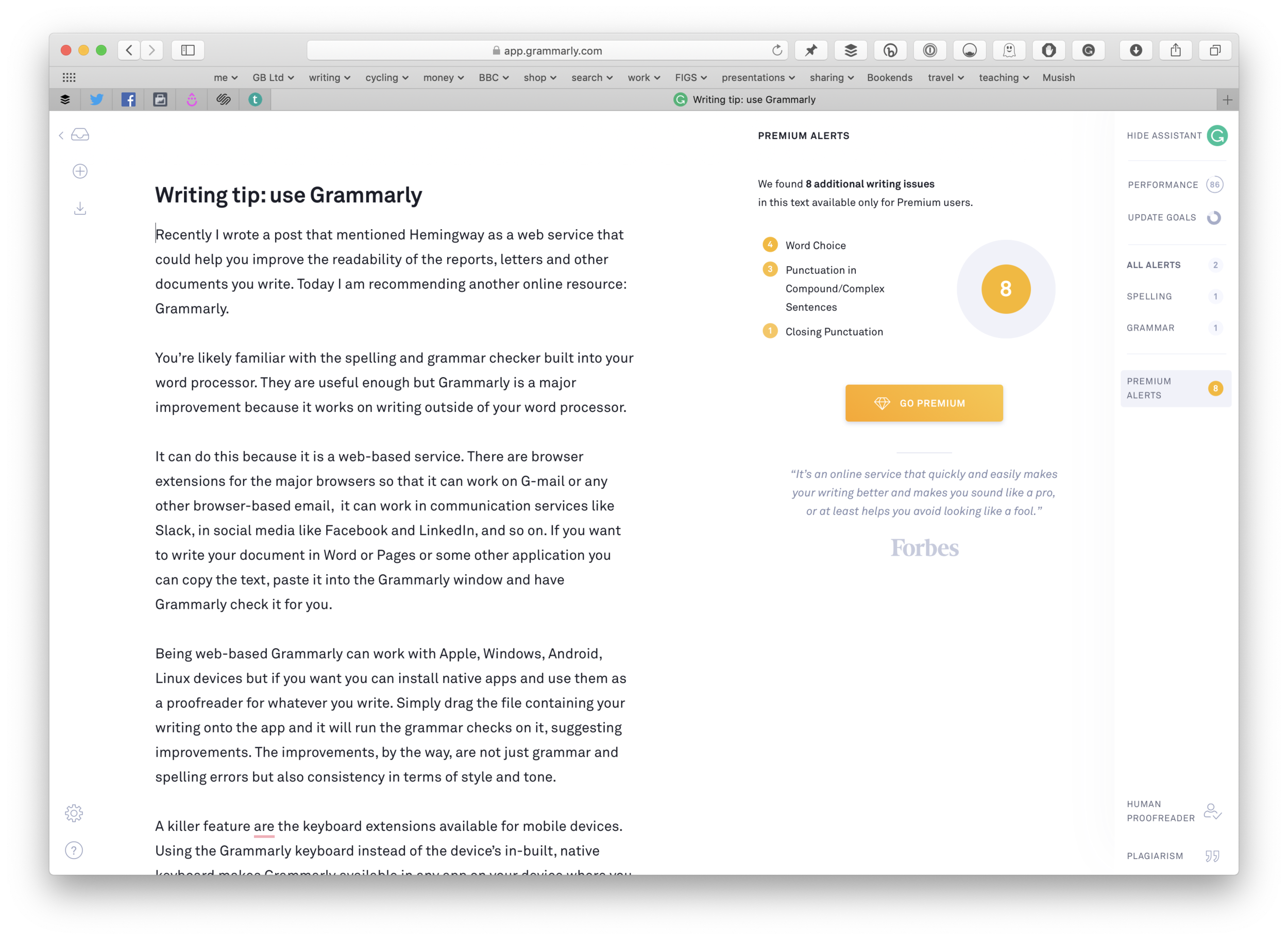
It does more than check grammar and spelling. You can tell Grammarly about your intent for a document, the audience, and some other features and it will take these into account. The image below includes the performance report telling me that the article is better than 86% of articles submitted to Grammarly and that a reader needs at least 9 years of education to understand it.

Being web-based Grammarly can work with Apple, Windows, Android, Linux devices but if you want you can install native apps and use them as a proofreader for whatever you write. Simply drag the file containing your writing onto the app and it will run the grammar checks on it, suggesting improvements. The improvements, by the way, are not just grammar and spelling errors but also consistency in terms of style and tone.
A killer feature are the keyboard extensions available for mobile devices. Using the Grammarly keyboard instead of the device’s in-built, native keyboard makes Grammarly available in any app on your device where you can type. This means you could check the grammar and spelling in text messages, WhatsApp, spreadsheets, etc
Grammarly is a freemium service. The free service is, in my opinion, adequate for most people. The premium level costs $140 a year (a much better deal than the $30 a month if you choose the monthly rate) and for this you get your writing checked against more advanced grammar rules, including sentence structure and style, and a plagiarism checker.
I think the free service is definitely worth checking out. I recommend it to my students when talking to them about writing essays and dissertations but whatever your writing needs it is worth a look. Even if you are a grammar expert you could still find it useful.
If you have a job which involves checking/editing/approving other people's writing you could save yourself a lot of effort by runningtheir words through Grammarly before you even read it. In that kind of situation paying $140 a year is a bargain for all the time you would save.
So, check it out at www.grammarly.com.
If you have any tips to help people write about public money please add them in the comments section.

The principles of public procurement explained in under an hour
I wrote a short e-book that explains the principles of public procurement by using the hiring of a consultant as an example. The book will take less than an hour to read and yet it includes an explanation of the key steps in the process and has links to additional resources to help with writing your specification (get this wrong and the chances of things going wrong increases dramatically) and managing suppliers.
It used to be the case that 75% or 80% of public money was spent on salaries and wages but for many public bodies that has fallen to 50% or lower. This is because public bodies now do less of their work directly and buy in services from third parties.
Knowing how to procure a service and then manage the service provider is an important set of skills for the modern public sector manager. Modern managers get plenty of training in how to interview job candidates, leading teams, managing employee performance, etc but but in my experience many they rarely receive any training in the equivalent activities for suppliers rather than employees.
To help such managers I wrote a short e-book that explains the principles of public procurement by using the hiring of a consultant as an example. (As far as procurement goes the consultant could be any kind of advisor such as an architect, an IT expert, an interim manager, etc.) The book will take less than an hour to read and yet it includes an explanation of the key steps in the process and has links to additional resources to help with writing your specification (get this wrong and the chances of things going wrong increases dramatically) and managing suppliers.
To get the e-book — did I say it’s free? — click here.
