The best books about how governments collect and spend your taxes
As part of the promotion of the upcoming third edition of Financial Management and Accounting in the Public Sector, I wrote a list of five books about how governments collect and spend your taxes. Check it out at https://shepherd.com/best-books/how-governments-collect-and-spend-your-taxes

As part of the promotion of the upcoming third edition of Financial Management and Accounting in the Public Sector, I wrote a list of five books about how governments collect and spend your taxes. Check it out at https://shepherd.com/best-books/how-governments-collect-and-spend-your-taxes

Grammarly can improve your writing wherever you write
Grammarly is a major improvement on the grammar checker built into your word processor because it works on writing everywhere. You can check emails, text messages, Facebook and LinkedIn posts, etc.
Recently I wrote a post that mentioned Hemingway as a web service that could help you improve the readability of the reports, letters and other documents you write. Today I am recommending another online resource: Grammarly.
You’re likely familiar with the spelling and grammar checker built into your word processor. They are useful enough but Grammarly is a major improvement because it works on writing outside of your word processor.
It can do this because it is a web-based service. There are browser extensions for the major browsers so that it can work on G-mail or any other browser-based email, it can work in communication services like Slack, in social media like FaceBook and LinkedIn, and so on. If you want to write your document in Word or Pages or some other application you can copy the text, paste it into the Grammarly window and have Grammarly check it for you. See below an early draft of this post inside of Grammarly.
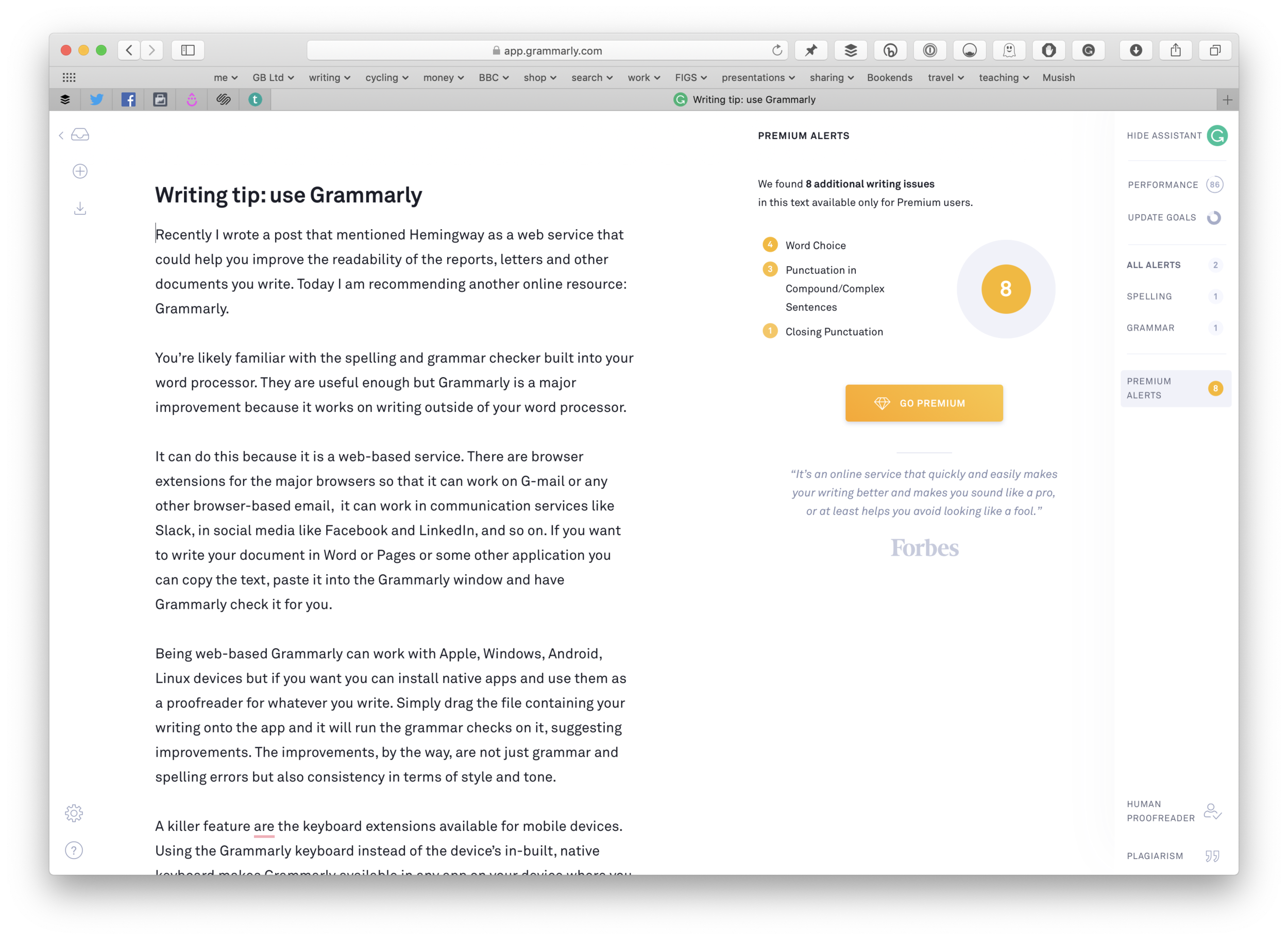
It does more than check grammar and spelling. You can tell Grammarly about your intent for a document, the audience, and some other features and it will take these into account. The image below includes the performance report telling me that the article is better than 86% of articles submitted to Grammarly and that a reader needs at least 9 years of education to understand it.

Being web-based Grammarly can work with Apple, Windows, Android, Linux devices but if you want you can install native apps and use them as a proofreader for whatever you write. Simply drag the file containing your writing onto the app and it will run the grammar checks on it, suggesting improvements. The improvements, by the way, are not just grammar and spelling errors but also consistency in terms of style and tone.
A killer feature are the keyboard extensions available for mobile devices. Using the Grammarly keyboard instead of the device’s in-built, native keyboard makes Grammarly available in any app on your device where you can type. This means you could check the grammar and spelling in text messages, WhatsApp, spreadsheets, etc
Grammarly is a freemium service. The free service is, in my opinion, adequate for most people. The premium level costs $140 a year (a much better deal than the $30 a month if you choose the monthly rate) and for this you get your writing checked against more advanced grammar rules, including sentence structure and style, and a plagiarism checker.
I think the free service is definitely worth checking out. I recommend it to my students when talking to them about writing essays and dissertations but whatever your writing needs it is worth a look. Even if you are a grammar expert you could still find it useful.
If you have a job which involves checking/editing/approving other people's writing you could save yourself a lot of effort by runningtheir words through Grammarly before you even read it. In that kind of situation paying $140 a year is a bargain for all the time you would save.
So, check it out at www.grammarly.com.
If you have any tips to help people write about public money please add them in the comments section.

The principles of public procurement explained in under an hour
I wrote a short e-book that explains the principles of public procurement by using the hiring of a consultant as an example. The book will take less than an hour to read and yet it includes an explanation of the key steps in the process and has links to additional resources to help with writing your specification (get this wrong and the chances of things going wrong increases dramatically) and managing suppliers.
It used to be the case that 75% or 80% of public money was spent on salaries and wages but for many public bodies that has fallen to 50% or lower. This is because public bodies now do less of their work directly and buy in services from third parties.
Knowing how to procure a service and then manage the service provider is an important set of skills for the modern public sector manager. Modern managers get plenty of training in how to interview job candidates, leading teams, managing employee performance, etc but but in my experience many they rarely receive any training in the equivalent activities for suppliers rather than employees.
To help such managers I wrote a short e-book that explains the principles of public procurement by using the hiring of a consultant as an example. (As far as procurement goes the consultant could be any kind of advisor such as an architect, an IT expert, an interim manager, etc.) The book will take less than an hour to read and yet it includes an explanation of the key steps in the process and has links to additional resources to help with writing your specification (get this wrong and the chances of things going wrong increases dramatically) and managing suppliers.
To get the e-book — did I say it’s free? — click here.


Add a touch of Hemingway to your next finance report
When it comes to writing financial reports I encourage you to adopt a plain, direct style. If you do not then, at best, your reports will be over-written and, at worst, you will obfuscate the message you are trying to communicate. (I suppose I should, on that basis, permit over-writing if your intention is to obfuscate!)
What did the authors Raymond Chandler, John Steinbeck and Ernest Hemingway have in common? Well, aside from being American, they all had a writing style that was direct; they did not waste words.
Sometimes I like to read a book with a lyrical style but for the most part I prefer the direct style of Chandler and co.
When it comes to writing financial reports I encourage you to adopt a plain, direct style. If you do not then, at best, your reports will be over-written and, at worst, you will obfuscate the message you are trying to communicate. (I suppose I should, on that basis, permit over-writing if your intention is to obfuscate!)
It is easy to fall into the trap of over-writing. When I first qualified as an accountant I wrote letters that included phrases like “I would be grateful to receive your remittance at your earliest convenience.” Now I would write, “please pay promptly,” or, better, replace promptly by a deadline date. This is much easier to understand, and takes fewer words, too.
None of us are in the league of Nobel prize-winning authors but we can improve through practice. When we write something of any length we can always read over it with a view to simplify it. These days we can also use technology to help us. Recently I came across a web service called Hemingway. All you need to do is paste the text you have written into Hemingway and it will assess the reading age needed to understand it and highlight sentences that are long and complicated, and words that can be replaced by simpler words.
If you’re interested, the first draft of this post had a reading age of Grade 10, 5 of its 17 sentences were hard to read, and 3 sentences were very hard to read. Using the app I fixed four of those problem sentences and got down to Grade 8.
If you want some help to improve your writing it is worth checking out Hemingwayapp.com. As well as the free web version, you can pay for a desktop version for Windows or macOS.

3 quick tips for formatting spreadsheets
Good design helps people to use products and this applies to spreadsheets and financial models as much as it does to smartphones and websites. When you create a spreadsheet you should consider how it is formatted as part of its overall design. I have made a short video with three tips for formatting your spreadsheets to ensure they are useable.
Good design helps people to use products and this applies to spreadsheets and financial models as much as it does to smartphones and websites. When you create a spreadsheet you should consider how it is formatted as part of its overall design. I have made a short video with three tips for formatting your spreadsheets to ensure they are useable.
The video is part of an online course, Financial Modelling in the Public Sector, which you can find here.
If you want more of these tips about writing and making presentations then join my mailing list.

Free online training from the IMF about public financial management
The IMF (International Monetary Fund) have created an 8-weeks long course about public financial management. It is free, and available to you whether you work in a government agency, an NGO or are just interested in public money and budget transparency.
They have produced a 2-minute introductory video.
And you can sign up for the course here if you are a government official or work for a development agency and here if you are a member of the public. I think I will sign up because we can all learn something new however much of an expert we think we are.